Software
Current Software
 Emacs
Emacs Maze
MazeJavascript Libraries
Unix/Dev Utilities
Old/Historical
 MultiTunes
 Beepwear
 Dict Client
 Quake
Quake Sherlock
 Multipac


Download Now!
Version 1.5
Mac OS X Universal Binary
Try it for free...
Purchase Registration Code
What is MultiTunes?
MultiTunes is an iTunes plug-in that lets you manage multiple iTunes libraries simply and seamlessly from within iTunes itself. There is no external program to run. It will work on Intel or PowerPC Macintoshes running at least Mac OS X version 10.3 (including Leopard).
How does it work?
MultiTunes does not move any of your music files when you switch libraries. In fact, only 3 files are touched: "iTunes Library" and "iTunes Music Library.xml" from the "Home -> Music -> iTunes" directory, and "com.apple.iTunes.plist" from "Home -> Library -> Preferences". These 3 files are moved in and out of the holding directories in "Home -> Library -> Application Support -> MultiTunes".
Even though your music files are not touched by MultiTunes, you can still have multiple music libraries on different disks. After creating a new Library go to the "Advanced" tab in the iTunes preferences where you can change where the music files for that library are stored. Note that even if you change where your music files are stored, the 3 files that MultiTunes touches still remain in their normal place.
Try MultiTunes before you buy it!
MultiTunes is shareware. You can try it for a while to make sure it works for you. Then you can purchase a registration code for $15.99.
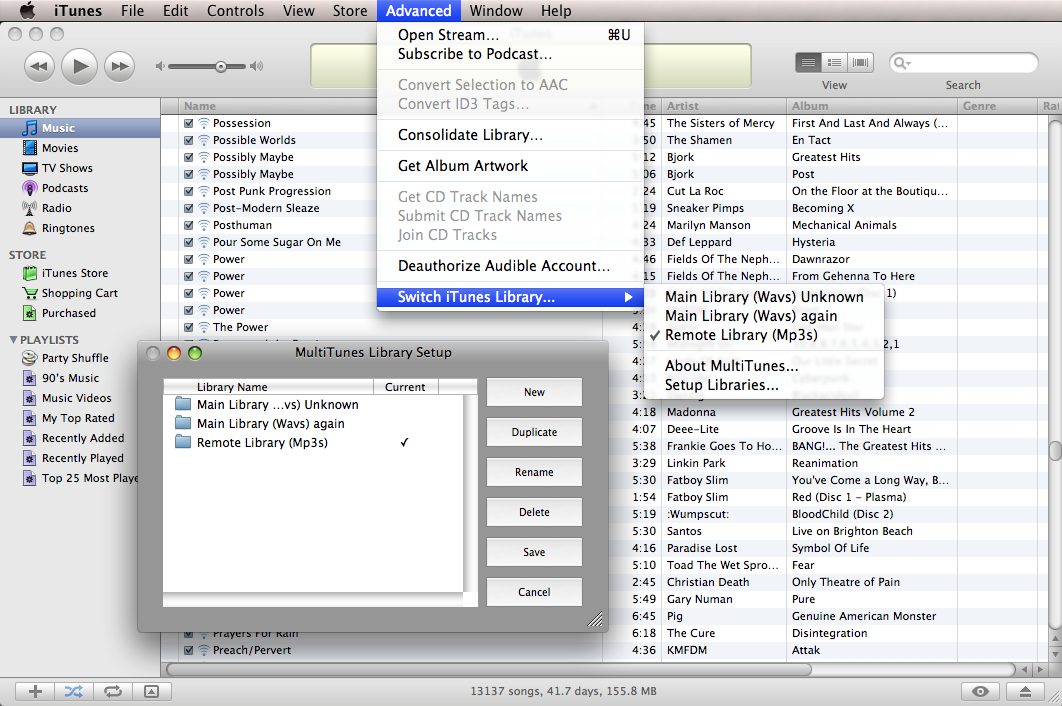
Screenshot:
A Note About iTunes 8:
If you used version 1.3 when iTunes 8 came out your iTunes may have started giving you an error like this:

Here is how to fix it:
- Open your "Music" folder.
- Find and open the "iTunes" folder.
- Throw the file named "iTunes Library Extras.itdb" in the trash.
- Throw the file named "iTunes Library Genius.itdb" in the trash.
And that should fix it. Don't worry, the files will be recreated when you run iTunes next.
Version History:
1.5 Released 6/27/9:
- Fixed crash when switching libraries with unregistered copies.
- Only ask about upgrades once per new version.
1.4.1 Released 10/21/8:
- Fixed crash when switching libraries with certain applications open.
- Provide more info when there's a new version of MultiTunes.
1.4 Released 9/13/8:
- Added compatibility with iTunes 8.
- Fixed MultiTunes timing out when switching out of very large libraries.
1.3 Released 11/12/7:
- Added ability to duplicate existing libraries.
- Automatically check for new version when iTunes starts.
- Fixed obscure bug that sometimes occurred when creating a new library.
1.2.2 Released 11/7/7:
- Added corrections to French translation from Jean-Matthieu Maro.
1.2.1 Released 8/22/7:
- Added Spanish translation from Gabriel Ortega
1.2 Released 2/7/7:
- Added French translation from Michael Caldwell and Matti Ghibaudo-Schneider.
- Fixed 10.3 support.
- Made entering code easier in registration window.
- Fixed clicking save after a rename.
1.1.1 Released 9/18/6:
- Added German translation from Christoph Schmitz.
1.1 Released 9/17/6:
- Fixed menu showing up in wrong place on iTunes 7.
- Added Rename button, since pressing return is annoying to guess.
- Made MultiTunes localizable (though no other translations just yet).
1.0.2 Released 8/8/6:
- Fixed timeout when iTunes takes too long to quit.
1.0.1 Released 8/7/6:
- Small fix so it works when the language is not English.
1.0 Released 8/6/6:
- First Release.